Granth Prakash · Library management software

Offline library software for government libraries

Complete library management that runs on your own computers — no internet needed. Marathi screens, barcode scanning, 21+ reports and daily backups. Trusted by more than 10 government libraries.

  • Used by 10+ government libraries
  • Works offline
  • मराठी + English
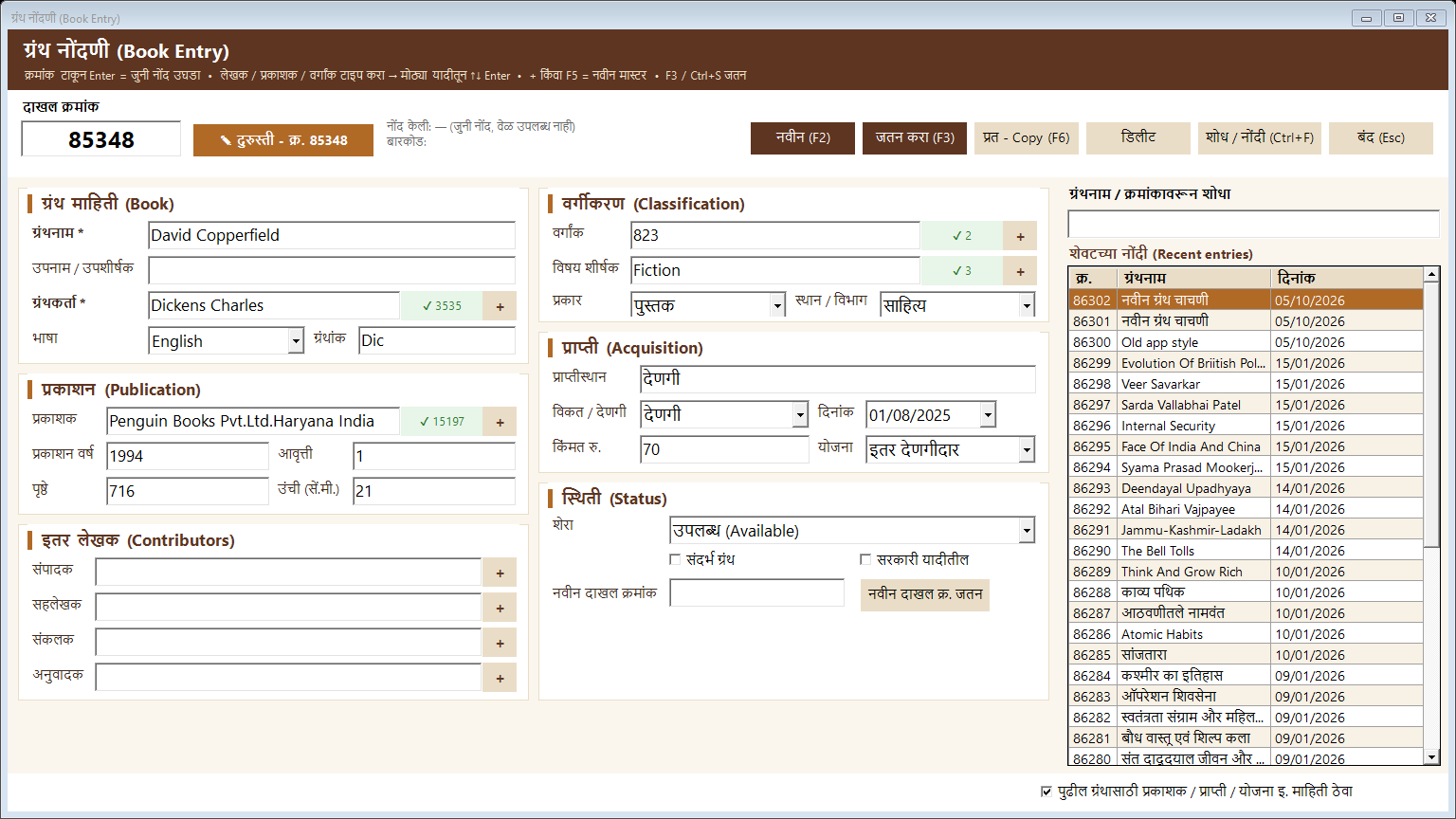
Granth Prakash — Book Entry (ग्रंथ नोंदणी)
10+Government libraries use it every day
86,000+Books handled smoothly in a single library
100%Offline — no internet connection needed
मराठीMarathi screens with English in brackets
See it in action

Screens from the software

Real screens shown with demo or test data.

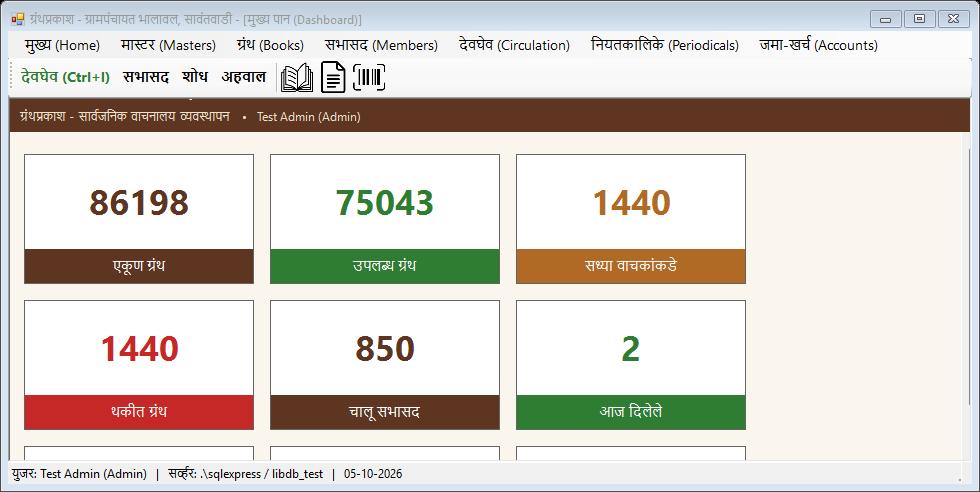
Dashboard (मुख्य पान). Live counts of total books, available books, books with readers, overdue books, active members and today’s issues.

Book Entry (ग्रंथ नोंदणी). Fast accession entry with smart suggestions for author, publisher, class number and subject, plus recent entries.

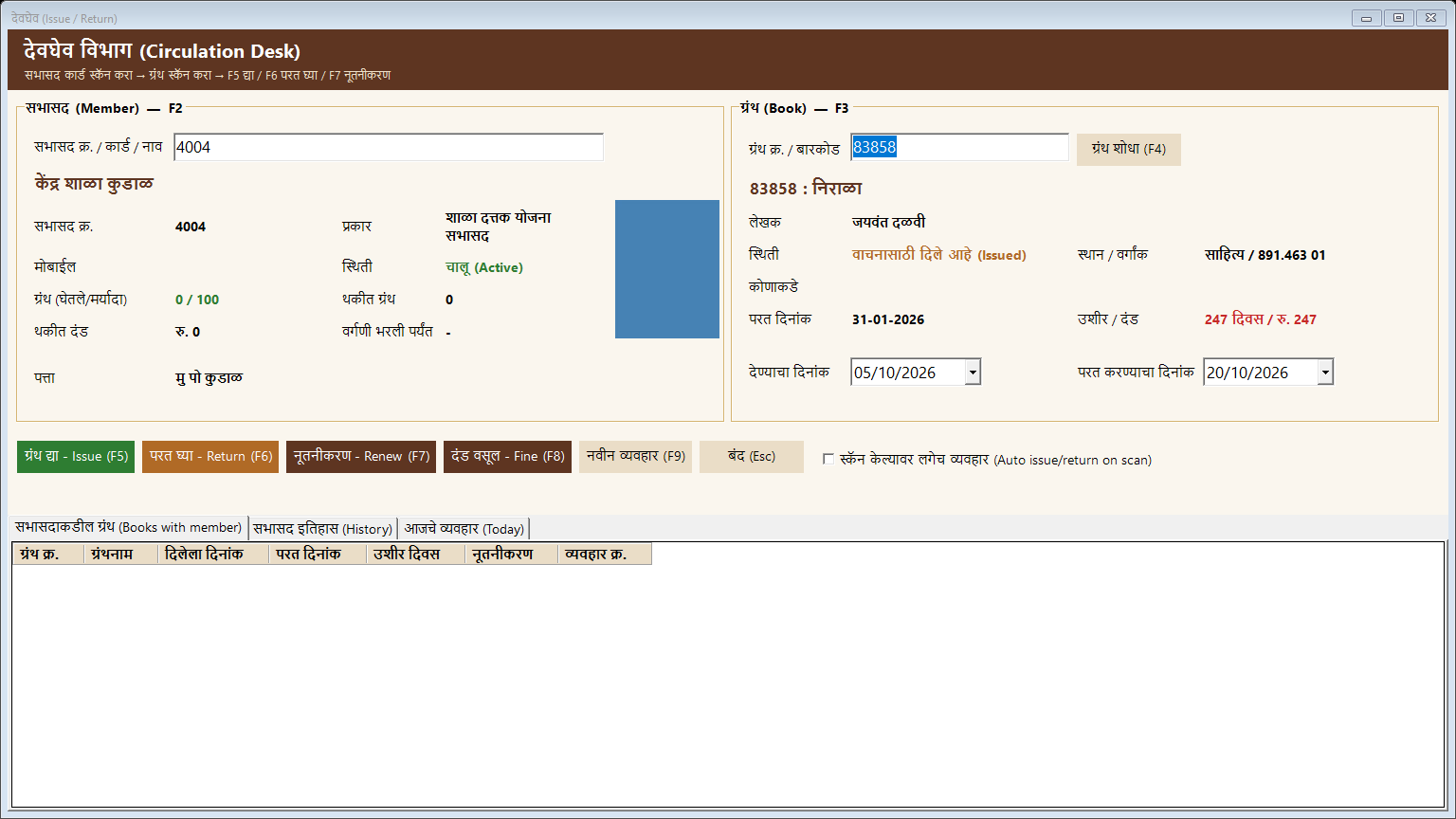
Circulation Desk (देवघेव). Scan the member card and the book — issue, return, renew and collect fines with single keys (F5–F8).

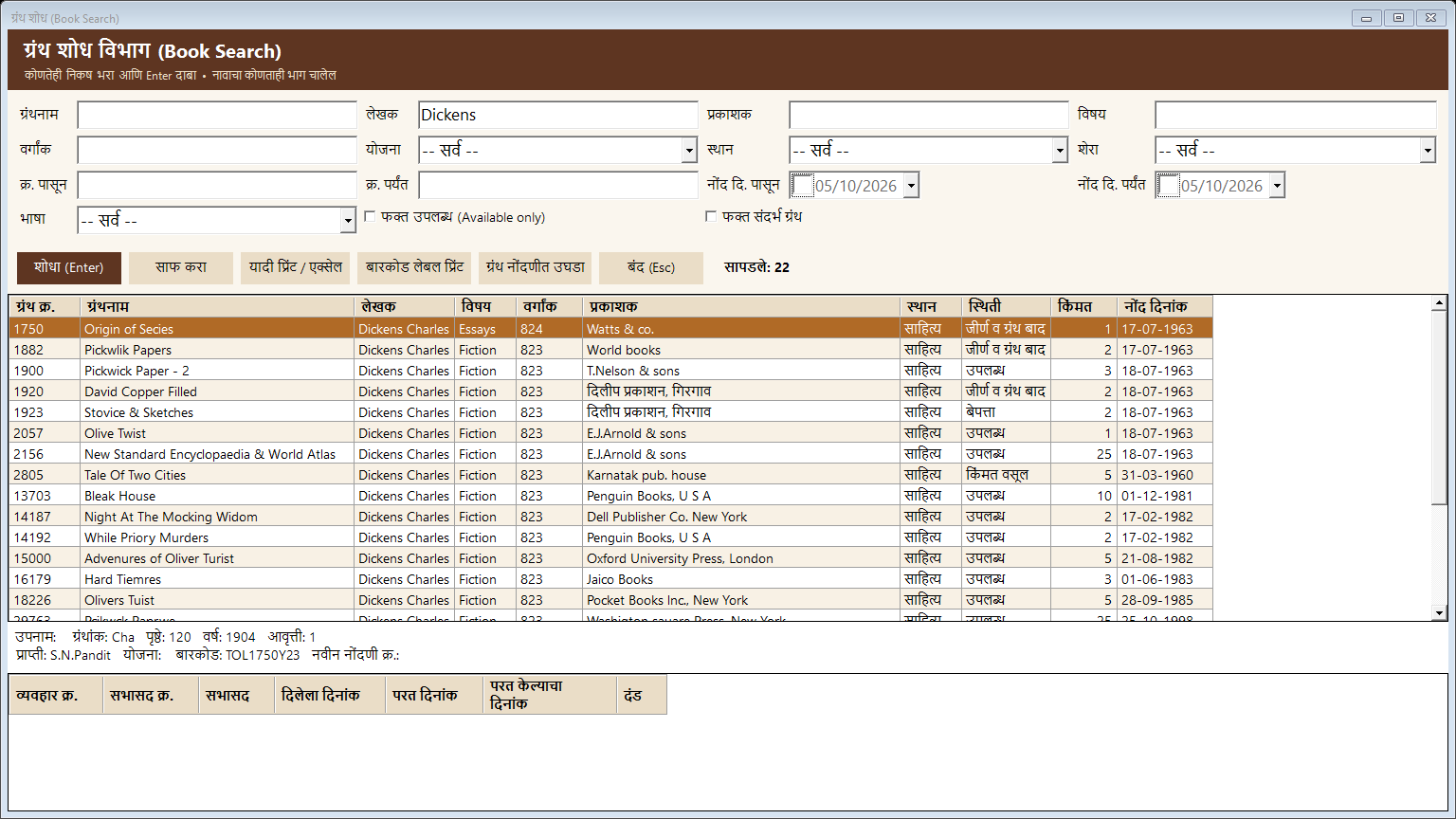
Book Search (ग्रंथ शोध). Search by title, author, publisher, subject, class number, scheme, location, status, language or date.

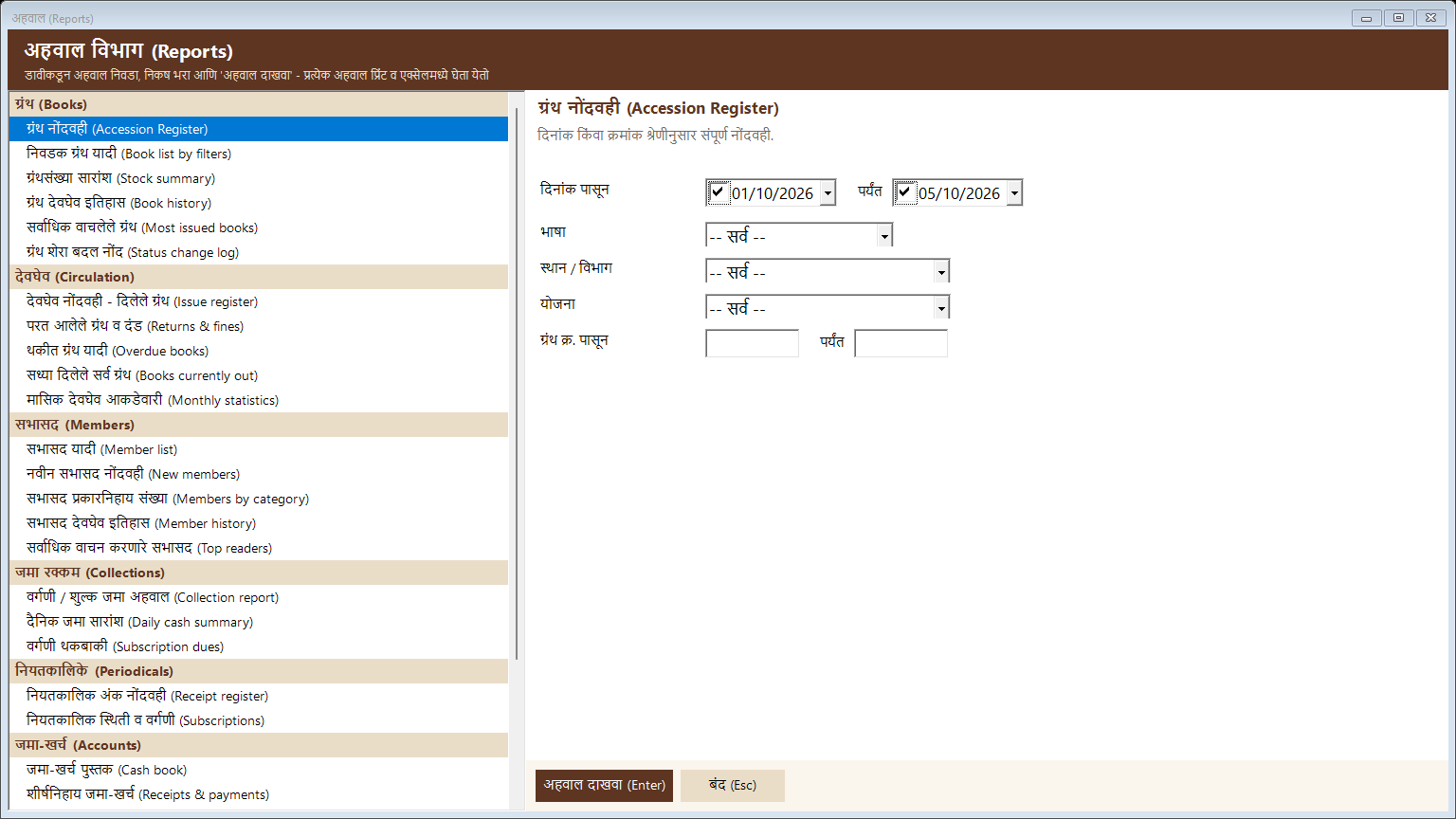
Reports (अहवाल). 21+ ready reports — accession register, overdue list, member list, collections, periodicals and cash book.

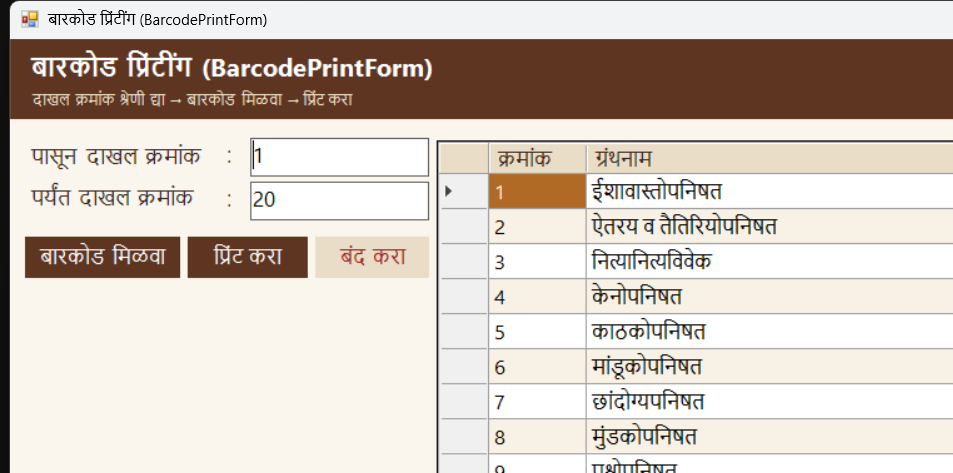
Barcode Printing (बारकोड). Print barcode labels for any range of accession numbers — works with any standard barcode scanner.

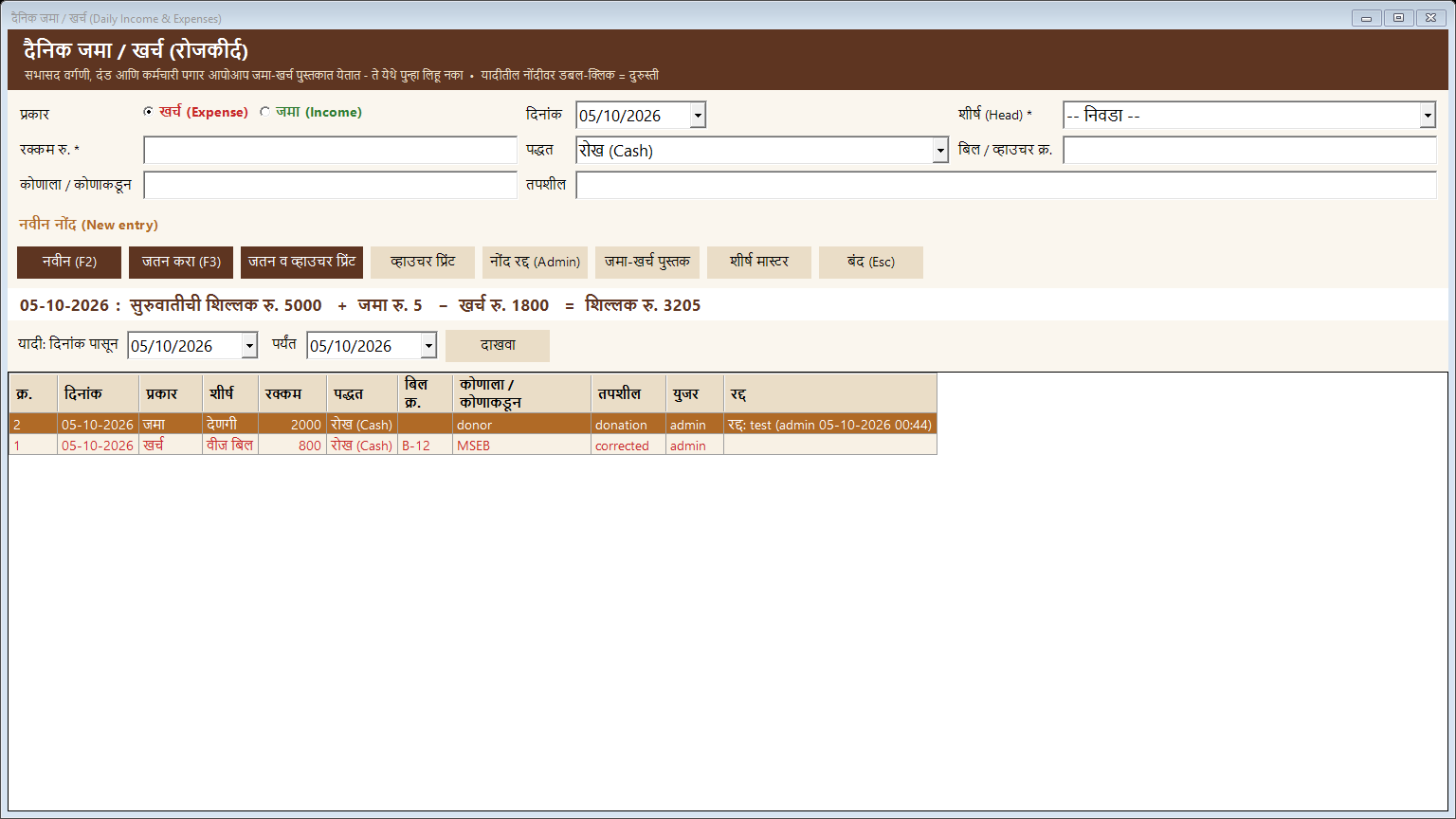
Accounts (जमा-खर्च). Daily income and expense entry with vouchers; fees, fines and salaries flow into the cash book automatically.

Features

Everything Granth Prakash does for you

Every feature below is available in the software today.

Book Entry & Catalogue

ग्रंथ नोंदणी
  • Accession number, title, author, publisher, edition, pages, price
  • Smart suggestions for author, publisher, class no. & subject
  • Copy entry for multiple copies (F6)
  • Language auto-detected from the title
  • Duplicate title warning
  • Entry date & time saved for every book

Circulation Desk

देवघेव
  • Issue, return and renew in seconds
  • Barcode scanner support for books & member cards
  • Due date set by member category
  • Blocks lost, damaged or already-issued books
  • Warnings for expired membership, overdue books & unpaid fines
  • Optional auto issue / return on scan

Member Management

सभासद
  • Member registration with photo
  • Categories with their own loan days & fine rate
  • Date of birth, guardian, occupation & ID proof
  • Duplicate mobile / name warning
  • One-click 1-year renewal & expiry alerts
  • Member ID cards with barcode

Fees, Fines & Receipts

वर्गणी / दंड
  • Subscription & membership fee receipts
  • Automatic late fine calculation
  • Fine capped at the book’s price
  • Receipt printed at the counter
  • Subscription dues list

Periodicals

नियतकालिके
  • Newspapers & magazines master
  • Daily issue receipt entry
  • Distributor / vendor master
  • Periodical receipt & subscription reports

Stock Verification

परिगणन
  • Start a verification session and scan every book
  • Scan from many computers in the same session
  • List of books not found
  • Mismatch report & mark missing books (Admin)

Barcodes, Labels & ID Cards

बारकोड
  • Book barcode labels for any accession range
  • Member ID cards with barcode & photo
  • Code 39 barcodes — no special font needed
  • Works with the labels you already use

21+ Reports

अहवाल
  • Accession register (ग्रंथ अहवाल) in the standard format
  • Book list by filters, stock summary, most issued books
  • Issue register, returns & fines, overdue list, monthly statistics
  • Member list, new members, top readers
  • Every report: print preview, print or Excel export

Accounts — Cash Book

जमा-खर्च
  • Daily income & expense entry with voucher print
  • Account heads master
  • Cash book with running balance
  • Head-wise receipts & payments, monthly summary
  • Fees, fines & salaries posted automatically

Staff, Attendance & Salary

कर्मचारी
  • Employee master — monthly salary or daily rate
  • Daily attendance (P / A / H / L / W)
  • Monthly salary sheet with deductions & advances
  • Salary slips (2 per A4 page)
  • Attendance & salary registers

Users, Security & Backup

उपयोगिता
  • Roles: Admin, Librarian, Clerk
  • Encrypted (hashed) passwords
  • Automatic daily database backup
  • Data health check finds and fixes old-data errors
  • Library name on every screen, print-out and export

Multi-Computer (LAN) & Marathi

नेटवर्क
  • One server PC + any number of counter computers
  • Works on the library’s local network — no internet
  • Full Marathi typing with large, clear fonts
  • Keyboard shortcuts for every desk (Ctrl+I, Ctrl+B, F2–F9)
  • Masters for author, publisher, class no., subject, location, scheme & more
Who it's for

Built for every kind of library

  • Gram Panchayat libraries
  • Sarvajanik Vachanalaya (public libraries)
  • District & taluka libraries
  • Government office libraries
  • School libraries
  • College libraries
  • Trust & community libraries
Getting started

Up and running in 4 simple steps

  1. 01

    Install on your computers

    We install the software and database on the main library computer — everything stays inside your library.

  2. 02

    Move your old data

    Already have books and members in an older system? We bring them over with every record kept.

  3. 03

    Connect counter PCs

    Add more computers on your local network so the issue desk and book entry can work at the same time.

  4. 04

    Training & support

    Hands-on training for your librarian and staff, daily backups set up, and support whenever you need it.

FAQ

Questions about Granth Prakash

Does Granth Prakash need an internet connection?

No. It runs completely offline on the library’s own computers. Internet is not needed for daily work, so it keeps working even where the connection is weak or unavailable.

Is the software available in Marathi?

Yes. All screens are in Marathi with English in brackets, and staff can type book titles, author names and member details in Marathi.

Can we use it on more than one computer?

Yes. One computer works as the server and any number of counter computers connect to it over the library’s local network (LAN).

We already have data in an old library program. Will we lose it?

No. We move your existing books, members and transactions into Granth Prakash and check that the record counts match before and after.

Does it work with a barcode scanner?

Yes. Book and member barcodes can be scanned at the circulation desk and during stock verification. The software also prints barcode labels and member ID cards.

How is our data kept safe?

Users log in with their own role (Admin, Librarian or Clerk), passwords are stored encrypted, and an automatic daily backup is set up on a separate drive.

Which libraries is it suitable for?

Government and Gram Panchayat libraries, public reading rooms (sarvajanik vachanalaya), district and taluka libraries, schools, colleges and trust libraries — from a few thousand books to 85,000+.

Free demo

Request a free demo

See Granth Prakash with your own library’s workflow. We can show it at your library or over a video call.

  • Live walkthrough of every screen
  • Setup, data transfer and training included
  • Reply within 1 working day

Request a free demo

Tell us about your library.

Your details are safe with us. We reply within 1 working day — usually much sooner.

Chat on WhatsApp